Day 3: Create your own VR app!
Bridges to Computing Summer Camp
Position, Rotation, and Scale

The position, rotation, and scale attributes use X Y Z notation. Position moves an entity (in meters), rotation spins it like a top (0 to 360 degrees), and scale makes it bigger in each direction (# times bigger).
Challenge: Put the sphere on top of the box. What attributes do you need to change? What axes?
Colors
Go to htmlcolorcodes.com and play around with the sliders. Do you see how the color code (something like #4CC3D9) on the right changes?

You can put these codes into the color attribute to change the color of an entity: color="#4CC3D9".
Challenge: Make the box color JMU purple!
Other Entities and Shapes
| <a-box> | <a-sphere> | <a-cylinder> | <a-cone> | <a-plane> |
| <a-torus> | <a-torus-knot> | <a-octahedron> | <a-tetrahedron> | <a-dodecahedron> |
Challenge: Try adding a "torus knot" to your scene and make it orange!
Adding Text
Add the following entity to your code. Change the value and the color to be whatever you'd like.
<a-text value="Hi! I'm NAME" align="center" color="#FFFFFF"
 rotation="0 0 0" position="0 0.5 -5" scale="3 3 3"></a-text>
Using the Headset
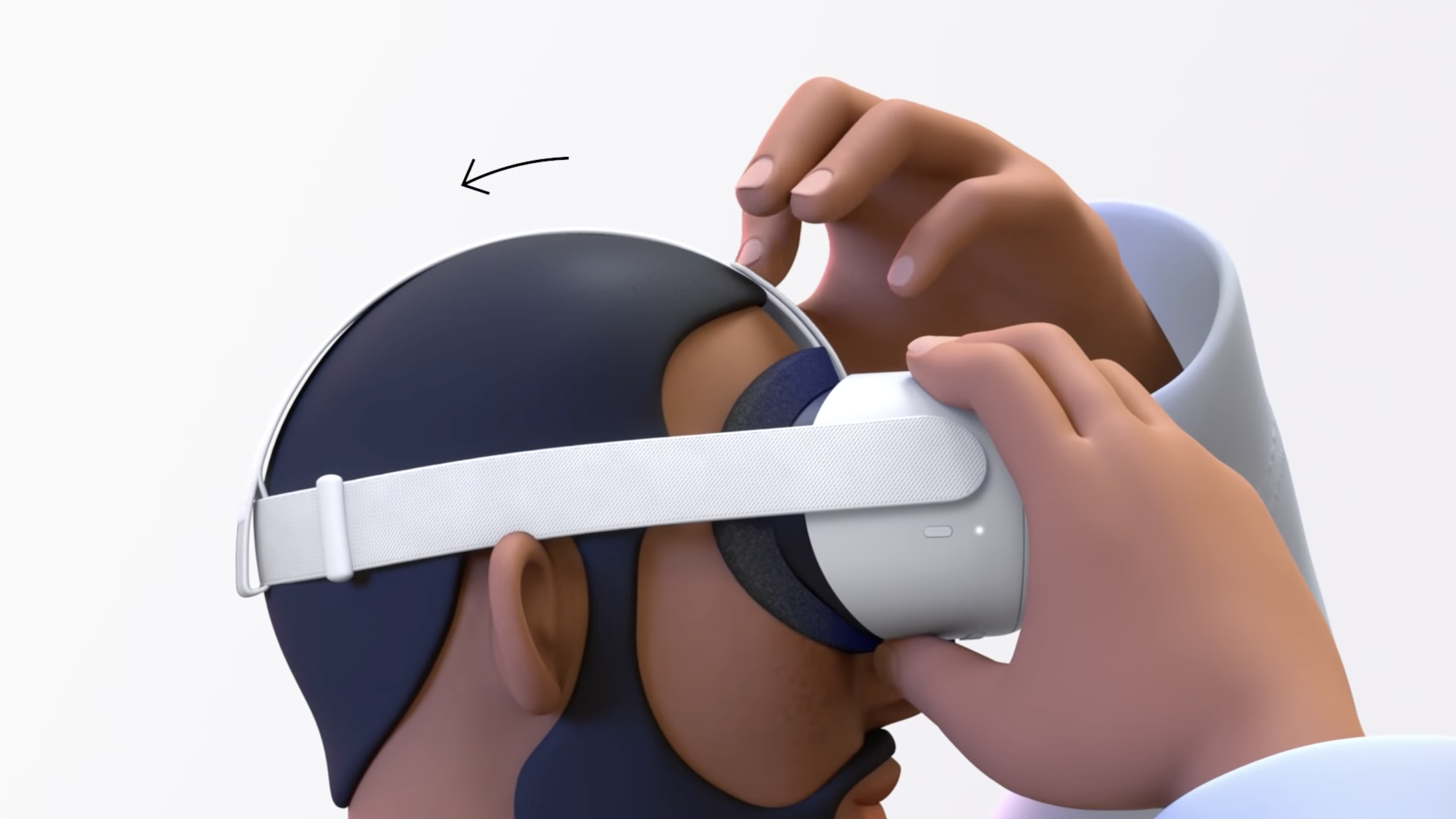
Put on the headset and tighten the top strap and pull on the back strap to make it snug.
Hold the controllers in each hand. Use the trigger to select things, and the grip button to grab objects.
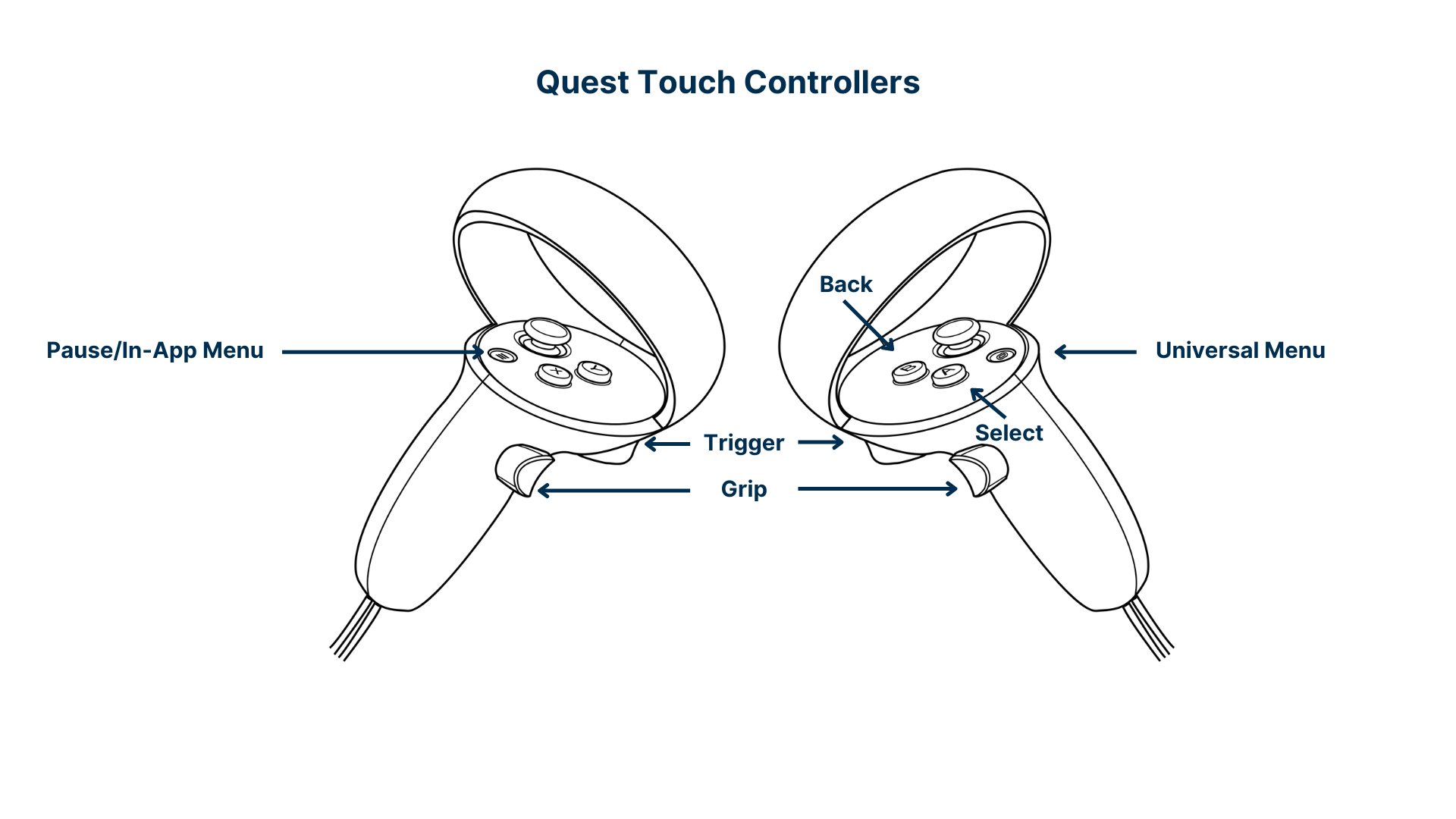
To move around in your world, push the thumbstick/joystick upwards to activate a teleporter, point to where you want to go, then release the stick to teleport there! It's like a superpower!
You can push the stick left and right to turn.
Why do you think we use teleportation in VR?
Changing the Background
In your code, add a new "a-entity" with environment, just like below:
<a-entity environment="preset: default; shadow: true"></a-entity>
Go to bit.ly/jmuvr-envs and click left and right at the bottom to see different environments. Make a note of the name ("default", "forest", "egypt", etc.). Replace "default" with the name of the environment you would like.
Environments: default, contact, egypt, checkerboard, goaland, yavapai, goldmine, threetowers, poison, arches, tron, japan, dream, volcano, starry, osiris, forest
Adding Animations
You can also add the animation attribute which lets you animate an object:
animation="property: position;
           from: -1 1 -1;
           to: 1 1 -1;
           dur: 1000;
           loop: 1"
"property" can be position, rotation, scale, or color.
"from" is the starting value, "to" is the end value for that property.
"dur" is the duration in milliseconds (1000 ms = 1 second)
"loop" can be true to loop forever, or the number of times to loop the animation
For more examples, go to: bit.ly/jmuvr-anim
Challenge: Make one of the objects grow really wide! What property would you use?
Adding Interactions
Our world is pretty, but doesn't move, meaning it's static. We would like to move objects around just like the real world!
To make an entity grabbable, add a grabbable attribute:
<a-box
    position="-1 1 -1"
    rotation="0 45 0"
    scale="1 1 1"
    color="#4CC3D9"
    grabbable
></a-box>
Add grabbable to every entity EXCEPT the plane (that's the floor).
Now you can grab and move objects around using the grip and trigger on the controller!
Adding a 3D Model
Go to the poly.pizza website and find a cool model!
Click it, then click Download → Download GLB

Save it to Downloads or the Desktop.
Now, in Glitch, click on Assets in the left menu, then click Upload an Asset:

In the file picker, go to the Desktop and select the GLB file you just downloaded. This should upload it into your project! Now, you should see your model inside Assets. Click on the model. You should see the following:

Click on the Copy URL button with the dinosaur 🦕
Go back to your code by clicking on index.html under Files in the menu on the left.
Now, create a new entity called a-gltf-model with a src attribute, just like below.
Inside the quotes for the src, paste your URL that you copied (Ctrl-V or right-click → paste):
<a-gltf-model src="PASTE YOUR URL INSIDE HERE"></a-gltf-model>
Now your model should appear! You can add the position, rotation, and scale attributes if you’d like:
<a-gltf-model
  src="https://cdn.glitch.global/..."
  position="0 0 0"
  rotation="0 0 0"
  scale="1 1 1"
></a-gltf-model>
Challenge: Animate your model so that it spins around and around forever!